Google Ads Fundamentals

Learn the Basics of Google Ads  

If you want to grow your business and attract customers, Google Ads is the right online advertising tool for you. Google Ads comes with many benefits that will help you reach your business growth desires. It allows you to target the customers that are right for you, control your budget, and view how many people engaged with your ad.

Choose Where Customers See Your Ads  

The Google Network is made up of two networks where your ads can appear: Search and Display. 

Google Search Network is an easy way for people to find you. By setting up your campaign to include keywords your ads can be displayed at the top of the search results, making it easy for people to find your business. The Google Search Network also displays ads across many sites and platforms, making it easier for people to connect with you in multiple ways across different devices. 

Google Display Network allows you to advertise on sites like YouTube, Blogger, and Gmail. This method also allows you to select the placements, the topics, and the audiences for your ads. The Display Network is a great way to target a large and yet very specific audience. This will ensure that you are sending the right message to the right consumer.

Create Effective Text Ads  

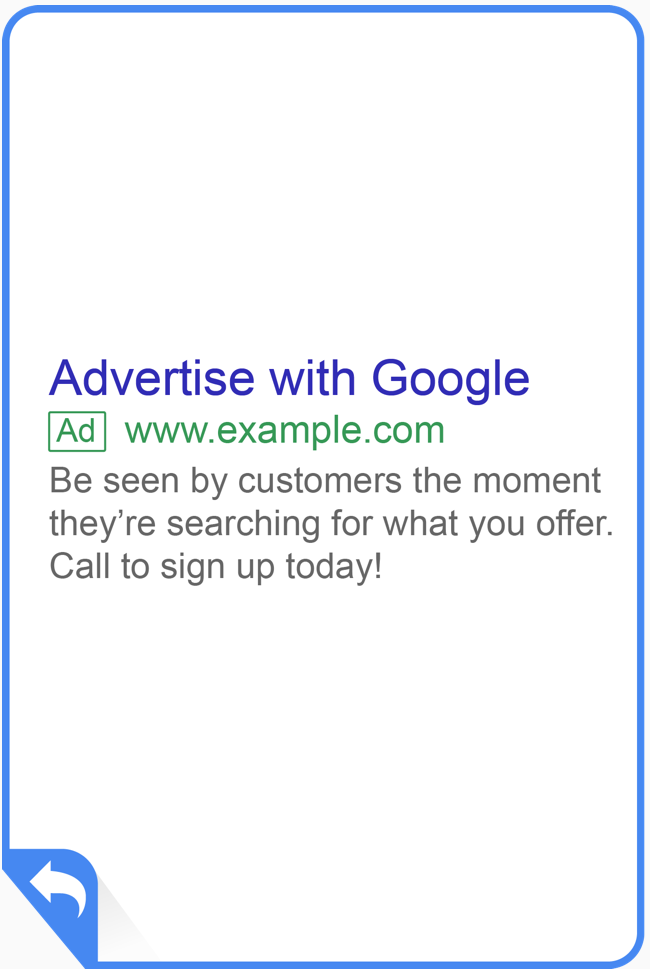
Only three parts are required for all text ads: headline, URL, and description. In order to get people to actually want to notice or click on your ad, it must be intriguing. Here are 5 tips to help you create effective text ads:
  1. Highlight what makes you unique from competitors
  2. Include a call to action to tell customers what they can do on your site once they click your ad 
  3. Include any sales or promotions you may have going on
  4. Include keywords in your ad text
  5. Match your ad to your landing page

Enhance Your Ads With Extensions  

Now that your ad looks intriguing, it is important that you add extensions to allow people to interact with your ad. Extension formats include call buttons, location information, additional links, additional text, and more. 

It is important to note that extensions only show up when it is predicted to improve your performance or when your ad’s position and Ad Rank is high enough for extensions to show.

The main point of adding extensions to your ad is to get customers to: 

  • Buy from your store location
  • Contact you
  • Interact with your website and download your app   

Choose The Best Campaign Types  

With a well-enhanced ad, you can then focus on choosing the campaign type that will determine where customers will be able to see your ads. 

Search Campaign 

  • Ads can appear in Google search results and other Google sites when people search for terms that are relevant to your ad’s keywords.

Display Campaign

  • Ads can appear throughout the Google Display Network. 
  • Allows you to set up targeting to match your ads to the most relevant display sites based on their topics, interested audiences, demographics, and more.

Search Campaigns with Display Opt-In

  • This selection allows you to show your ads on the search results page of the Google Search Network and relevant placements on the Display Network. 

Video Campaign

  • Allows you to run video ads on YouTube and on sites across the Google Display Network.
  • Available video ad formats include: TrueView in-stream ads, TrueView video discovery ads, and bumper ads.

Shopping Campaign

  • Might see your ads in Google Shopping, next to search results, and near text and responsive ads. 
  • They can also show up on Google Search partner websites like YouTube.
  • This campaign type is useful for retailers who want to promote their online and local inventory, boost traffic to their website or local store, and find better qualified leads.

Universal App Campaign

  • Can easily promote your app across Search, Display, and YouTube. 
  • Ads and bids are automatically adjusted to get the most downloads for your app. 

After you choose the campaign type, you can then adjust your campaign settings to better suit your business needs. This includes:

  • Campaign Name
  • Campaign Type
  • Networks
  • Devices
  • Locations and Languages
  • Bidding and Budget
  • Ad Extension
  • Additional Settings

Organize Your Account For Success  

There’s nothing better than being organized and ensuring that everything is in place. To keep your account organized it is important that you: 

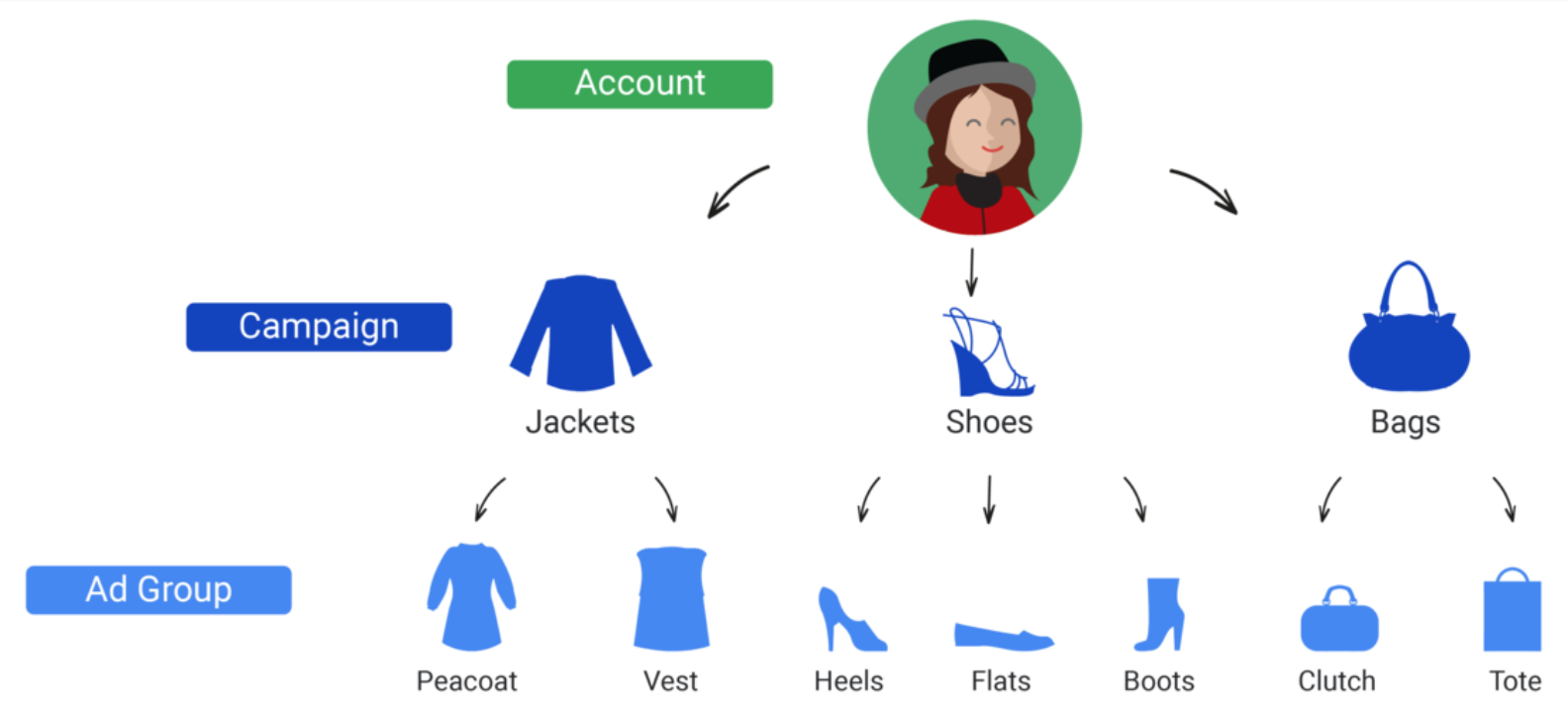
  1. Create separate campaigns for different product areas, promotions, or regions
  2. Create separate ad groups with relevant keywords and bids for each product or service
  3. Explore if a Google ads manager account is right for you
Reach Customers With Targeting  

If you want your ads to target and meet the right types of consumers then it is important to know who is your target audience, where your customers are in the physical and online world, and what they are interested in. By following these three W’s you will be able to reach the right types of people who are likely to be potential customers. 

Help Customers Find You  

One of the most effective ways to help customers find you are by including keywords in your ad. You have probably seen me mention this multiple times by now. This is because this technique is very important and beneficial. To help you make a list of keywords that describe your business, here are 7 useful tips you can use.

  1. Think like a customer
    • What would they search?
  2. Organize your keywords by theme
    • Group keywords by structure, such as product line, brand, or geography
  3. Select specific keywords to target specific customers
  4. Select general keywords to reach more people 
  5. Use negative keywords
    • Include products or services that you do not offer
  6. Pick the right number of keywords
    • 5 to 20 keywords are recommended
  7. Choose keywords that relate to the websites or apps your customers see

Control Which Searches Trigger Your Ads  

There is no point in having your ads be shown to people who are not likely to become your customer. By looking at different match types, you can determine how to effectively trigger your ads.  

  • Broad Match
    • Shows your ads based on keywords and close variations like synonyms and misspellings.  
  • Broad Match Modifier 
    • Shows your ads based on the broad match, but excludes synonyms.
  • Phrase Match 
    • Shows your ads based on exact phrases and close variations.
  • Exact Match 
    • Shows your ads based on exact keywords and close variations.
  • Negative Match 
    • Shows your ads based on searches and site visits that exclude keywords.

Make Your Ads Seen  

With other competitors out there, it is important that your ad stands out and comes up first. In order to determine where your ad will be shown, it depends on 

  • Your bid, 
  • The impact of your enabled ad formats, 
  • Your ad’s expected clickthrough rate (CTR), 
  • Ad relevancy, 
  • And finally, the landing page experience when users click on your ad

Google Ads auction is the system responsible for taking all these factors into consideration and ultimately decides your ad’s position and even whether it shows up at all. If the quality of your ad is high it means that your ad is relevant, thus getting you the most desirable placement on the page.  

Match Media Cost Models With Your Budget 

Now it’s time to determine which cost models will benefit your campaign goals. 

Cost Per Thousand Impressions (CPM)

  • Whether people see your ad or not, the price is the same every time your ad is shown 

Viewable Cost Per Thousand Impressions (vCPM)

  • Makes your ads viewable 
  • Only pay when your ads appear in visible areas on the internet

Cost per Click (CPC)

  • Whenever someone clicks your ad you pay the publisher a certain rate.

Cost per View (CPV)

  • Consists of a video ad
  • You only pay if someone watches your video or clicks around on it

Cost per Acquisition

  • You only pay if a customer does something you want them to, like buying something from your website or signing up for a newsletter after seeing or clicking on your ad

Determine A Good Bidding Strategy  

Google Ads runs an auction every time it has an ad space to fill. Without a proper bid, you won’t be placed in the auction and your ad will not show. Google Ads gives you two options to bid for your ad:

  1. Manual Bidding
    • Allows you to control the bidding yourself
  2. Automated Bidding
    • Allows Google Ads do the bidding for you

Once you choose how you want to bid, you can then choose a bid amount that works for you. If you use cost-per-click (CPC) bidding, which most starters use, you can set a maximum cost-per-click bid that’s the highest amount you’re willing to pay for a click on your ad. Google Ads provides tools to help you choose an amount to bid.

  • Bid Simulator
    • Runs “what-if” scenarios 
    • Helps you determine how many more impressions you would have got if your bid was increased
  • Keyword Planner
    • Shows you how often some keywords get searched, and gives you cost estimates at a glance.
  • First-page Estimates
    • Helps you see how much you may need to bid to put your ad on the first page of Google Search results.

Select Your Bid Strategy  

It has now come to the part of selecting your bid strategy. To determine which strategy to use, we are going to go more into detail about automated and manual bidding.

Automated Bidding:

  • Google Ads can automatically increase bids for impressions that it predicts
  • Must have time to optimize existing campaigns
  • Conversion tracking feature is preferred
  • Campaign should be getting at least 15 conversions and 15 clicks per month
  • Depending on whether you want more ad clicks, revenues, or conversions you can:
    • Maximize conversions bidding automatically sets bids at auction time to get you as much conversion volume as possible within your campaign’s budget.
    • Enhanced cost per click (ECPC) adjusts your bids to get you as many conversions as possible, within your determined budget. 
    • Target CPA automatically sets bids to help get as many conversions as possible at the target CPA you set 

Manual Bidding: 

  • If you don’t have enough conversions to meet the recommendations for automated bidding
  • You have 100 percent control of how you pay for views, clicks or conversions

Adjust Bids To Favour Performers  

Google Ads metrics allow you to view and adjust bids based on:

  • Device
  • Location 
  • Time of Day
  • Top Content
  • Targeting Methods
  • Remarketing Lists for Search Ads
  • Interactions

Align Your Budget With Your Goals  

Depending on whether your campaign goal is to increase your brand awareness, get customers to click your ad, or drive sales, you can set your budget accordingly. Here are four different ways that you can calculate your budget:

  1. Calculate based on your monthly budget
  2. Calculate based on your average cost-per-click
  3. Find your campaign’s recommended budget
  4. Check your ad delivery method

Evaluate Campaign Performance

Google Ads helps you improve campaign results by showing you what’s working and what’s not. For example, Google Ads shows you information on

  • What searches and site terms have triggered your ads
  • Where the people were that triggered the ads
  • What geographics your viewers care about
  • Whether or not your landing page needs work
  • How people are finding you – with or without your ad

Another way to measure and help drive campaign results is through metrics. For example:

  • Impressions shows how often your ad was shown on a search result page or site on the Google Network.
  • Clicks show how many clicks your ad has received. 
  • Clickthrough rate (CTR) shows the percentage of people who could see your ad and clicked on it. 
  • Conversions show how many people clicked from your ad to your site and did something you valued, such as a purchase, sign-up, phone call, or download.
  • Cost per conversion shows how much each ad conversion cost you. 
  • Conversion rate shows how many conversions on your site resulted from an ad click. 

Avoid Editorial Errors  

If you want your ads to be seen then it is important that you follow the editorial policies. Not only do they ensure a consistent and clear user experience but it also enforces quality standards on the ads and the websites advertised on the Google Network. Avoid editorial errors such as spelling and grammar mistakes as well as style and quality issues. This includes using symbols and emojis. These errors can be the main reasons your ad can be disapproved.

Address Trademark Disapprovals

If your ad gets disapproved regarding a trademark, you can either remove the trademark from your ad or you can request a trademark authorization. If you go with the second option, you will have to:

  1. Get a hold of the trademark owner
  2. Fill out the “3rd Party Authorization Request Form”
  3. Contact the trademark owner to request authorization to use their trademark
  4. Re-submit your ads so they can pass through the review process again.

There are also site policies that allow you to use trademarked terms without explicit authorization for advertising in particular countries. This is the reseller and informational site policy. In order to qualify for either policy you must have a dedicated landing page and detailed information about your products or services. However the informational sites require you to correspond these requirements with the trademark.  

Conclusion

Apple is a well-known technology company and is one of the biggest mobile phones producers out there.  With Apple being the reputable company it is, it uses Google ads to promote their latest iPhones.  This picture is an example of one of their Google ads. 
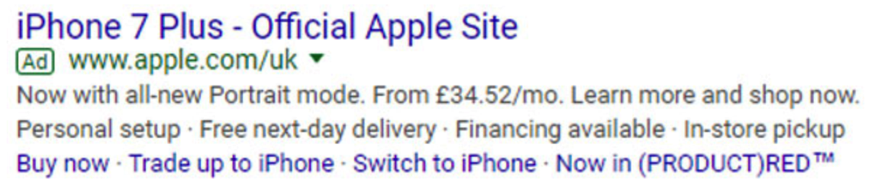
The ad’s headline starts with the name of the iPhone 7 Plus and states that it is from the official apple store. This lets people know that it is not from a different retailer or a scamming third party site. The description of the ad starts by listing some of the features the phone offers such as the “all-new portrait mode” and the monthly price. The ad lists features such as “personal setup”, “free next-day delivery” and “financing available”. These are great incentives that could convince one to buy a new phone. Finally, the ad finishes off with 4 call to action buttons. These buttons range from “buy now” to “switch to iPhone”. These calls to actions are a great way for people to take action right away whether it be buying the iPhone or learning more about the product.  

I completed the Goggle Ads Fundamentals assessment and received a certificate after passing with a score of 97%. This shows I know the basics of Google Ads and how to promote business online. Now that you have all the tips on how to effectively use and manage Google Ads, you can use it for your business to increase your brand awareness and generate more sales. 

Reference

Google Ads Fundamentals. (2019). Retrieved from https://academy.exceedlms.com/student/path/3132-google-ads-fundamentals


Choosing the Right Digital Marketing Tools

Introduction 

If you want your business to be seen and be known by as many people as possible then stay tuned for some great tips to help you do so. In the video “Marketing Tools: Digital Marketing,” Anson Alexander provides effective tips on how to pick and use different marketing tools and platforms to help increase your brand awareness.   

Foundations of Digital Marketing

Digital marketing consists of a variety of different tools and platforms that can be used to attract new customers to your business. The different areas of digital marketing are:

  • Social Media Marketing 
  • Email Marketing 
  • Display Advertising
  • Video Marketing
  • Content Creation and Curation
  • Search Engine Optimization (SEO)
  • Affiliate Marketing

Knowing which platforms and tools to use can significantly help build your brand awareness. Alexander states that it is important to know how to pick the right tools and platforms that are right for your business. For example, it is important to pick tools and platforms that have a proven track record, are scannable, and can provide multiple solutions (Alexander, 2019). They should also be time efficient and cost effective.   

Social Media Marketing

This type of marketing is when you post updates to social media platforms such as:

  • Facebook
  • Twitter
  • Instagram
  • Snapchat
  • LinkedIn
  • Pinterest

These platforms are used to increase your brand awareness while also allowing you to build relationships with current and new customers. That being said, it is important to know which platforms will be the most beneficial for your business. Platforms such as Facebook, Instagram, and Twitter allow you to post content that is available to customers 24/7, whereas content posted to Snapchat is only available for 24 hours. 

In order to help you pick the right platforms, Alexander suggest setting goals to measure what you are looking to get out of social media marketing. This can be about whether you are trying to drive traffic to your site, looking for direct sales, or trying to build a following (Alexander, 2019). 

Promoting your content using social media provides many benefits for a business. For example, Facebook, Instagram, and Twitter allow you to boost your posts so that it appears directly in front of the viewer in the middle of their feed. These platforms also allow you to narrow down your reach by the demographics your business targets. Not only does promoting your content by boosting your posts help increase your following but it also gives you results on the engagement your post received such as the shares, comments and reactions on your post.                

Once you have decided on the social media platforms that you think will be the most beneficial to your business, you can use automation tools that will help you manage these platforms all at once. Each tool allows you to schedule your posts, review analytics, and take part in social listening to help you monitor what people are saying about your business. Each tool has some unique features that set it apart from the others. For example,

  • Hootsuite 
    • Is $30 a month and allows you to access 10 social profiles
  • Agorapulse
    • You can revive evergreen content, which allows you to upload a post that never becomes “out-of-date” (Alexander, 2019) however often you please.
    • It is $40 a month 
  • Buffer
    • Offers a free plan and allows you to access 3 social accounts
    • The next plan is $15 a month and allows you to access 8 social accounts
  • SproutSocial
    • Has a customer relationship management (CRM) system, built right into it. 
    • It is $100 a month and allows you to access 3 social accounts 

All of these tools offer a free trial, so be sure to check them out to see which ones offer you the most benefits.

Digital Advertising  

When it comes to display advertising,there are a few options to use for your display advertisement campaigns. While each tool is free to use, you still have to pay for your advertisements. 

  • Google Ad Manager:
    • Has the highest reach out if all the other tools. 
    • Ads appear on mobile devices they would on a computer. 
    • Is accessible at admanager.google.com 
  • Facebook Ads Manager:
    • To access Facebook Ad Manager you must have a Facebook page in which you can then go to Facebook.com/adsmanager to get started.
    • It allows you to run campaigns and create ad sets for your targeting such as the demographic you are targeting.
  • Bing Ads:
    • Displays ads in the Bing Ad network and bing search results
  • Yahoo Ads:
    • Displays ads on Yahoo and Yahoo search results
    • To access Yahoo Ads go to gemini.yahoo.com/advertiser.
  • Media.net:
    • Combines the Bing and Yahoo Ad networks so that you can advertise on both networks from one place. 
  • Propeller Ads:
    • Is its own network
    • Specializes in popup ads 
  • Nanigans:
    • Is a smaller tool
    • Has a big network

Now we are going to look into search engine marketing. This is when you pay to get a link at the top of search engine results. The following are some of the main search engines: 

  • Google
  • Bing
  • Yahoo
  • Baidu (Chinese search engine)
  • SEMrush
  • SpyFu

Video Advertising is also a great digital advertising tool. Here are some tools that are great for this:

  • YouTube
    • Has a good reputation
    • Easy to use
  • Oath 
    • Owned by Verizon 
    • Enables cross-platform advertising
    • Great option for larger organizations that have a higher advertising budget
    • You will have a go-to person to help you with your advertising campaigns
  • OpenX Video 
    • Has the highest-quality advertisements out of all of the ad networks
  • AppNexus 
    • Owned by AT&T
    • A cross-platform video marketing tool. 
    • You can advertise on website videos and on television.
  • Facebook
    • Allows you to boost video posts 
  • Oath 
    • Owned by Verizon 
    • Enables cross-platform advertising
    • Great option for larger organizations that have a higher advertising budget
    • You will have a go-to person to help you with your advertising campaigns
  • OpenX Video 
    • Has the highest-quality advertisements out of all of the ad networks
  • AppNexus 
    • Owned by AT&T
    • A cross-platform video marketing tool. 
    • You can advertise on website videos and on television.
  • Facebook
    • Allows you to boost video posts 

Mobile Advertising is a form of advertising via mobile apps. Here are some great options for this kind of advertising.    

  • Google AdMob
  • Media.net
    • an all-encompassing advertising network.
  • Apple Search Ads
    • This is for advertising in the Apple App Store. 
  • Unity Ads
    • This is a gaming engine that many developers use to program mobile games. 
  • InMobi 
    • They focus specifically on mobile advertising
    • They have a large network. 
    • Very high quality
  • TextMagic 
    • Allow you to market with text messages. 
    • eg) receiving a coupon by text message that you have signed up for with your phone number. 

Content Creation and Curation

When it comes to actually creating content for your marketing campaigns, there are a number of different options for you to choose from.

  • Adobe Spark 
    • Known as one of the top companies for producing graphic design softwareIt is free, and it allows you to create graphics, videos and slideshows
  • Adobe Creative Suite
    • Great tool for very detailed and complex content creationContains Photoshop – best for editing photos. 
    • Contains Adobe Illustrator, which is good for vector art. 
    • Contains InDesign, which is great for layouts. It also contains Adobe Premiere for video
  • Final Cut Pro 
    • Is Apple’s video editing software
    • Has a very high learning curve. 
  • Gimp
    • It’s the GNU Image Manipulation Program
    • It is a free program with open-source Photoshop.
  • Canva
    • Is great for creating graphics like infographics, things to post on social media and memes 
    • Easy to learn and use 
  • Pixler Editor
    • Free program for simply editing images.
    • You can change all of the saturation contrasts, you can crop images, do a lot of the stuff that you would do with Canva or Gimp, 
    • More user-friendly than Gimp. 

Content curation is about “building trust and showing users that you care about them enough to find the most valuable information to share with them” (Alexander, 2019). Alexander provides some tools to help curate your content.

  • Scoop.it
    • Is easy to embed into your website. 
    • It is one of the most popular tools used for delivering curated content. 
    • Great tool for embedding some curated content on a website or blog. 
  • Feedly 
    • Is one of the most popular RSS and blog readers in the world. 
    • Great way to subscribe to certain blogs you find interesting. 
  • Pocket 
    • Is great for saving the content that you’ve found to post later on. 
    • Allows you to capture content from everywhere. 
    • Allows you to can save videos and articles. 
    • You can even go into apps on your phone and save it in the Pocket app.
  • Pinterest 
    • Pinterest is a great tool for curating visual content such as graphics and photos.
  • Scribble 
    • A good option for larger-sized organizations
  • Pearltrees 
    • You can organize all of your posts that you’ve found, and then you can embed it on your website. 

Email Marketing 

Alexander (2019) mentions someof the considerations that you should look forwhen trying to decide on the best email marketing systemfor your business. Email marketing systemsshould include and consider:  

  • Size of Email List
  • Lead Generation/Integration
  • Automation 
  • Ease of Use
  • Scalability
  • Analytics
  • A/B Testing

Now that you are aware of the key qualities to look for in email marketing tools, you can decide which one is the best suitable to your type of business.

  • HubSpot
    • It is a full-fledged reader-centric email marketing system.
    • You can integrate social media and most website platforms. 
    • They offer very robust analytical data, A/B testing, lead generation, lead scoring, and automation. 
    • You can start at $50 a month for the version that includes email marketing.
  • Constant Contact
    • Offers good personalized support.
    • You can start with a free trial 
  • AWeber
    • A great tool for lead generation
    • Provides a 30-day free trial then amounts to $19 a month for up to 500 subscribers. 
    • They offer automation tools and an easy way to create and customize templates with a drag and drop editor. 
  • ActiveCampaign 
    • A fully functional email-marketing platform that has CRM functionalities. 
    • Integrates really well with WordPress and you can market based on your user behavior.
    • Offers A/B Testing
    • The first tier, the Lite tier starts at $17 a month and you can email up to 1,000 contacts. 
  • MailChimp
    • It is one of the most popular platforms 
    • It is easy to use 
    • You can get your email newsletter out there an hour or two after you sign up for your account. 
    • Has a lot of app integration
    • You can use Google remarketing along with Mailchimp. 
    • It integrates with your social media 
    • It integrates with Salesforce, Shopify and WooCommerce. 
    • Offers a free trial
    • The free account starts with 2,000 contacts. 

Search Engine Optimization (SEO)

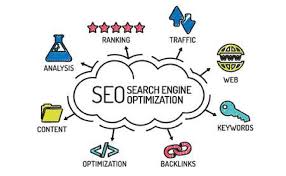
Search engine optimization has many benefits, in which it can result in an increase in traffic to your website, provides trackable and quantifiable results, and is cost-effective as it targets users who are actively looking for your products or services online. Some of the free SEO tools consist of:

  • Google
    • Think of a good name for your topic
  • Yoast SEO
    • This is a plugin for WordPress. 
  • Ubersuggest 
    • Allows you to see how many times something was searched along with the actual volume of searches
    • Informs you how much advertisers are willing to pay for clicks on these search terms.
    • It also tells you how difficult it will be to rank for this search term. 
  • Google Keyword Planner
    • Built into Google Ad Manager
    • Must have a Google account for this
    • Allows you to see the estimated bids and how high the competition is, along with the average monthly searches.

You can also use paid SEO tools that are just as effective in search engine optimization.

  • Moz Pro 
    • An all-in-one tool. 
    • It will check back links to our website
    • It will see which keywords you are ranking for, and will suggest new keywords that we can try to rank for. 
    • We can even look at some of our effectiveness of our social media campaigns, how we’re trending on our Facebook and Twitter, and that sort of thing.
    • It is $99 a month for the standard account
  • SEMrush 
    • A great tool for doing research on your competitors. 
    • You can see what key phrases they are ranking for, how they’re trending, and what the back links to their websites look like. 
  • SpyFu
  • Ahrefs 
    • This tool has the largest database, second to Google, of back links.

Affiliate Marketing

Alexander mentions that running an affiliate marketing campaign for your product or service is not easy. He has provided some tips for you to think about when selecting an affiliate marketing platform. A good affiliate marketing network should have:

  • Good Payment Structure
  • Robust Tracing Features
  • Commission Customization
  • High Quality Affiliates
  • Good Reputation

Now that you have the key qualities to look out for when searching for a good affiliate marketing network, you can choose which network will be the most beneficial for you. 

  • CJ affiliate
    • Is free to enter 
    • Has a good reputation
  • Rakuten Marketing
    • Focuses on quality 
    • It has a very robust screening process in place to make sure that the publishers that are promoting the products and services of the merchants are very high quality, 
    • A reputable network
  • Clickbank
    • Focuses more on digital products.

Conclusion 

Digital marketing is a great way to increase your brand awareness and attract new customers. Alexander provides many great tips and advice on what qualities to look for in different tools and techniques for digital marketing. I work for a local retail-clothing, and we use Facebook, Instagram and Snapchat as part of our social media marketing campaign. In the past year we started boosting our posts on Facebook and Instagram and narrowing our reach to the types of people that may be interested in our products and who are located in Alberta. As a result, it has helped our business reach a larger audience of people that are interested in our products and who may be potential customers. Not only has it increased our brand awareness but boosting our posts has allowed us to see the engagement our posts receive, such as the shares, comments and reactions on the posts. This enables us to see what kinds of posts are more interactive than others. We encounter new customers in our store almost every month that let us know that they discovered us on either Facebook or Instagram. 

Now that you have all the tips on what tools and techniques to use for digital marketing, put it to use and watch how your business grows.

References 

Alexander, A. (2019). Marketing tools: Digital Marketing. Retrieved from https://www.lynda.com/Marketing-tutorials/Discover-top-digital-marketing-tools/753915/5021042-4.html 

Achieving Business Success from Your LinkedIn Profile

Introduction

LinkedIn is a great profile that or making business connections and demonstrating credibility in your industry by highlighting your achievements. In the video “LinkedIn Profiles for Social Business Success,” Bert Verdonck (2017), a Master Trainer on LinkedIn provides great tips and tricks to help you effectively use the platform and have your profile stand out from others.

Get started With the Essentials 

A properly managed and updated LinkedIn profile can help you attract new prospects and get your name and your organization to be noticed. Verdonck (2017) mentions that a good profile should have: 

  • Visibility: in which your profile is easily accessible and looks good online
  • Strong Presence and Connectivity: Shows how strong your network is
  • Likeability: A good reputation 
  • Credibility: Publishing articles to help raise your personal brand and your social capital
  • Trustability: Your profile can help you be viewed as a role model and leader.

In order for your profile to contain these qualities, it is important that your profile has your:

  • Name: with different variations of spellings if applicable
  • Picture: A recent headshot with a neutral background
  • Headline: a thought-provoking statement to help you connect and start conversations with a potential business lead. 
  • Location: An address where people can find you or your organization
  • Industry: To give others a better understanding of what you do. 

Your Contact Information 

Your contact information should consist of your email, instant messenger, phone, and address. These should be current and professional sources of contact.  

Besides email, social media accounts are a popular way for people to get in touch with you. If you have a professional Twitter account you can link it to your profile, along with two other websites where people can learn more about you or your business. You can also indicate how you want people to contact you. For example, Verdonck (2017) mentions that he advises people who want to connect with him to add a personal note with their invitation, and people who have questions are invited to go to one of his groups to ask their question. This call to action can be used during your summary and your experience sections.  

Your Summary

Your summary should align your personal, professional, and corporate branding together. You can start by giving an overview of what your organization does in one or two paragraphs depending on the size of your organization. You can then provide some information on your professional role including what you do. Verdonck (2019) states that you may even add in what you do not do and what you are not interested in. This will help to prevent any unnecessary inquiries. 

Using YouTube videos or other files such as a PDF, MS Word or PowerPoint in your summary can also help it stand out and increase the engagement of your profile.  

Your Experience

Just like in your summary, you want to provide information about your organization and professional role. This time you want to go more into depth about what you do. For example, state what your daily tasks consists of, as well as when and why people should get in touch with you. You may even want to share your responsibilities and your achievements in this section. Verdonck (2017) suggest making it as tangible as possible by providing absolute numbers or percentages if applicable. 

You can then go into a description of your previous work experiences. You can explain what your roles and responsibilities were, your achievements, why you loved that job, and what you learned from it. It is important to try to include recent and relevant previous work experiences in this section. Ending this section with a link or a way of contact will allow people to learn more. 

Using media to share your experience is also very key in this section. This technique can help set your profile aside from others, as your profile may be more visually appealing and intriguing. Again, providing a call to action will help people to continue the conversation or learn more about you and your organization. 

Create Your Own Brand

LinkedIn has a section where you can write a description and highlight the special things you have done.  

  • This includes listing any awards you have received, who awarded it, and the date you received it. 
  • You can also list any patents you may have, including its particulars.
  • Listing your certifications will show others that you meet industry standards, and may even place you into a higher-skilled level than others who may have a similar experience (Verdonck, 2017). Be sure to include the certification authority, your license number, and a certification URL if available.

LinkedIn also has a place for you to showcase your projectsand connect them to colleagues and clients. By adding projects to your LinkedIn profile,you increase the chances of people learning what you can do to help them.

  1. Start with giving your project an attractive project name. 
  2. Continue with linking it to your occupation and a project URL, if available. 
  3. Add a short description with results if you can. 
  4. Check confidentiality and compliance factors before sharing any concrete information.
  5. Indicate the start date and end date, unless your project is on-going,  
  6. Add the relevant team members and colleagues involved. This can show that it was a collaborative effort and that you are a team player.

Another great feature LinkedIn provides is allowing you to publish content such as articles to help you build your brand. “You can use it to see what your peers are reading, learn from LinkedIn influences, or stay on top of your industry’s news to share ideas on the job” (Verdonck, 2017). After you add a cover photo and engaging headline, you can start writing your article. Verdonck provides some tips on writing an effective article. 

Verdonck mentions that the article should:

  • Be about your specific area of expertise, 
  • Have an engaging title
  • And, use specifics, numbers, examples, and verifiable statistics.

Providing some of your expert knowledge on your profile can also offer something that is helpful to your target audience. This can include a one pager, a PowerPoint presentation, a PDF document, or even an infographic or a short video. Verdonck (2017) gives an example of an expert in search engine optimization (SEO) sharing 10 practical tips on SEO. Not only does this show one’s expert knowledge but it also plays a part in the give and receive concept, in which others may want to return the favour. 

Skills and Recommendations

When adding your skills to your profile it is important to only include those that are relevant, real, and professional. For example, Verdonck (2017) suggests avoiding using “buzz words like dynamic, motivated, passionate, responsible, innovative, strategic, or creative”. Instead, focus on professional skills that make you stand out.

LinkedIn also allows you to have recommendations on your page, in which others may say some good things about you and your work ethic or skills. You can scroll to the recommendations section on your profile, and click on the “ask to be recommended” link. It must be someone you are directly linked with on LinkedIn. A good recommendation usually includes an indication of your relationship with that person, examples of the key skills that they were impressed by, along with genuine and tangible results that you showed (Verdonck, 2017).

Your Education

The education section of your profile should consist of the following:

  • The school, college or universityyou graduated from
  • The name of your degree
  • Your field of study.
  •  Your grade, if it is worth mentioning
  • Activities and societies if applicable
  • Extracurricular activities you may have participated in 
  • The year you finished your degree, if applicable
  • A general description of why you chosethis particular study or school
  • You could add a “topic of your thesisor other papers you’ve writtenthat you feel fit here” (Verdonck, 2017). 
  • You could also add what you learned andhow you changed. 

It is also a good idea to add any kind of continued education you may have completed. This can include any form of formal education or certifications. You may even add your test scores if they are relevant, as well as the test date, and a brief description of it.

Make the Most of Your Personality

In order to add a personal touch to your profile, you can add your personal interests to show some personality on your page. For example, Verdonck (2017) has “Happy Chocoholic” in his summary. Not only does this add some personality to his profile but it also helps start conversations with others.  

Adding any volunteer work you have done is also a great way to add a personal touch to your profile. It is key to indicate the responsibilities your volunteer work consisted of, the goals you have achieved and what skills you acquired from it. You may even find that others visiting your profile have also done the same volunteer work as you. Not only can this create new connections for you, but it can also show others that you are a passionate professional who is good at multitasking (Verdonck, 2017).  

Extra Strategies to Stand Out

There are other ways for your LinkedIn profile can stand out compared to others. For example:

  • Maximizing keywords on your profile can help your target audience to find you. This includes using words, phrases, and even different spellings in your profile that they would use.
  • Engaging with others using LinkedIn groups allows you to pop up on people’s radar easily and brings more people to your profile.
  • Following leaders that are the most influential to your career can help you stay motivated as well as updated on the latest information. Interacting with these posts can make you visible to like-minded people.
  • Control your visibility using privacy settings to allow people to become more or less physical, approachable, and successful.
  • Use special symbols, icons, and text to differentiate your profile from others, especially for those using the LinkedIn profile app.

Conclusion 

Verdonck has provided great advice on how to effectively use LinkedIn for social business success. I used some of these tips and have already noticed great results. For example, aside from liking, sharing, and commenting on others’ posts, I started engaging in LinkedIn groups. This has allowed me to get noticed by others more easily and has even bought them to my profile. Not only do I ask questions in these groups, but I also provide others with my thoughts and knowledge on certain topics. This allows others to see my expertise and build connections with them. Another beneficial tip I learned from Verdonck that I now use is: following channels and leaders that are influential to my career. This has allowed me to receive a constant feedof articles on my homepage every time they publish one.By interacting with these posts,I have started to become visible on their radar, and people in my network see that I am staying on top of the latest information. As a result of using Verdonck’s tips, I have noticed an increase in the number of people who have viewed my profile and have even created some great connections with people from my industry. 

Now that you have all these tips and tricks, you can spice up your profile to help build great connections with others from your industry.

References

Verdonck, B. (2017). LinkedIn profiles for social business success. Lynda. Retrieved from https://www.lynda.com/LinkedIn-tutorials/Welcome/512777/581571-4.html 

Content Marketing to Help Your Brand

Introduction

If you want to improve your brand awareness and create engaging and relevant content for your brand then get ready for some great tips and suggestions to help you create effective content. Not only will you be able to engage more people to your content but you will be provided with a variety of different hacks on how to create, promote, and measure the effectiveness of your brand content.  

Defining Content Marketing 

In the video “Content Marketing Foundations,” the author Dayna Rothman (2015) defines content marketing as the process of “creating valuable, relevant content to attract, acquire, and engage your audience” (0:25). Rothman has provided 7 qualifications to help you further understand what content marketing should consist of. 

It should:

  1. Engage individuals on their own terms
  2. Be based on interactions with buyers
  3. Tell a continuous story
  4. Be the right fit for channels
  5. Have a clear purpose
  6. Be almost always evergreen

Brand awareness is key when it comes to creating good content marketing. Not only does it allows buyers to be able to successfully find your content when they do a search but also efficiently. Creating brand preference is also very beneficial. Rothman (2015) states that it allows you to create a bond with your customers so that they trust you and would want to do business with you. Good content marketing also allows you to reach more buyers at a lower cost. By building that trust with your customers and creating long-lasting content, you will be able to be more cost efficient. 

Bombarding customers with too much information can turn them away from looking through your content. For this reason, Rothman suggests using thought leadership in your writing as it pulls customers toward your content rather than pushing your marketing message onto them. Another great tip Rothman recommends is using the 411 aproach when setting up your content programs. This approach consists of the top four pieces being the educational assets that will help you get your message across. The two promotional pieces on the bottom consists of the a promotional soft-push piece like a report that mentions your product or service. The other one is the hard-push, piece which is a type of sales data sheet that really explains your product. Using these techniques will help you in creating engaging and relevant content.

Creating a Foundation for Content Marketing

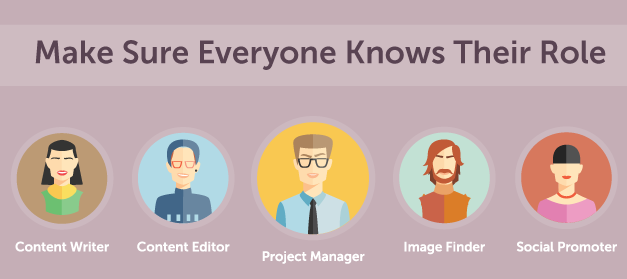
When working on any big project it is more efficient to have a team around you to help you with different parts of the project. This also works when creating content marketing. For example, having a managing editor or associate editor who will be helpful in creating the content strategy, coordinating the team and being in charge of the quality of the content (Rothman, 2015). Rothman suggests using LinkedIn to find qualified people to be apart of the team.  

Once you have your team in order, it is important to have your teams aligned with each other and with your content. This will ensure that everyone is aware of the mission and vision of your content. You can then start to concentrate on how you will engage your buyers. 

There are many different types of buyers out there, each with their own buying journey. This is why it is important to figure out the different personas of your buyers and what they care about. Rothman (2015) suggests consulting with sales or customer service to find out what the buyers are like, what they prefer, and what types of problems or questions they have. She also suggests to ask customers themselves. This process ensures you have information from all sides and can create the right type of content to intrigue your buyers. 

We already know that buyers have personas that make them different from each other. This is why you should create an effective persona for your brand by developing your brand voice. This will ensure that it stands out from the rest. For example, setting the tone, style and, language of your brand will give your brand a recognizable and engaging persona.

Before putting your plans into action it is essential that you set your content goals. Rothman suggests using 4 steps to help you set your goals. 

  • The first step she suggests is to meet with the stakeholders to get their point of view on goals. 
  • Secondly, ask yourself some foundational questions such as why you are creating content and what your short-term and long term goals are. 
  • The final steps are to define your qualitative and quantitative goals. After setting your goals you will then be able to move ahead. 

The last step in creating a foundation for content marketing is choosing your content technology. Rothman (2015) suggests using content project management and production platforms as they help to prioritize and assign tasks and project manage your different pieces of content. They also help you create an editorial calendar so that you have a full view of all of your content across your organization and have everything in one place. 

Creating Your Content Plan

The first essential step to writing anything is brainstorming ideas, especially when starting to create your content plan. Rothman (2015) suggests analyzing industry trends and competitor content to see what others are offering or lacking. This will help you get a good idea of what your content should consist of. Once you are done brainstorming ideas, you can then start mapping out your content. This will help move your new buyers into becoming actual customers. 

Choosing your content type is the next step. Rothman provides many ways you can choose to present your content. For example:

  • Blogs are fantastic for trend related content,and when you need to put out a point of viewat a very fast pace. 
  • Cheat sheets are short pieces of downloadable content that are created to give the reader quick access to a series of tips or best practices.
  •  A definitive guide is a very large content piece, often over 60 pages.
  • An Ebook is an electronic version of a shortened book. 
  • Infographics are generally vertical graphics that are short and easy to consume. 
  • Reports often contain lots of statistics, a strong point of view.
  • Videos are an engaging and visual form of live action content that can be filmed and promoted on youtube, social channels, and your website. 
  • webinar is either a live or recorded presentation that a speaker presents along with a slide deck. 

After you figure out which content type you are going to use, you can start crafting your plan and editorial calendar. The calendar will help align your team with the content strategy across your organization so that everyone knows what content is being created and when. 

Creating Your Content

Now that you have a plan in place, you can begin writing your content. By following these steps provided by Rothman, you should be able to effectively meet your desired results. 

Step 1)  Research your topic, either by a subject-matter expert in your organization who knows about your topic or yourself.

Step 2) Create an outline. It will keep you organized and on track with your content creation. Including the thesis in the outline will also help summarize the main point of the piece. 

Step 3) Write your first draft. Ensure that it flows well by including an introduction and conclusion. Rothman also suggests using bullet points and lists to help keep your writing structured organized and scannable. 

Step 4 ) Review your work. Look for structure, spelling and grammatical issues. Also, try to get 2 other people to review your work as each person may catch different mistakes.

Step 5) Write a second draft. Incorporate all the edits from the first draft, read it over a few times and make your final draft.

After completing your final draft you can then start designing your content. Regardless of the type of content you are using it should be clear, easy to read, colorful, and visually appealing. Rothman (2015) also suggests curating your content, which may include relevant articles or blog posts that work for your business, different industry “best of” lists, trend highlights, or news roundups.

Promoting Your Content

There are a few key steps to consider before actually promoting your content. One of the first things Rothman suggests to use is a gating strategy. This consists of collecting information on your customers by putting up a form in front of your content that customers have to fill out (Rothman, 2015). You can either gate all your content, gate only the assets that show buying intent when downloaded, or not gate any of your content.

You will then have to outline your promotion strategy. Rothman suggests using 4 keys steps to help you out. 

Step One) Create a strategy document. This should include: 

  • What topic the content is created about 
  • Who the audience is 
  • The different goals that the content piece addresses.
  • The thesis 
  • The table of contents, if available. 
  • The buying stage that the content was created for. 
  • Any promotion suggestions that you or the team may have.

Step Two) Score your content. Scoring your content can help determine how close a person who downloads your content is to being a customer. 

Step Three) Meet with your stakeholders.  This will allow you to meet with your various promotional teams to go over goals and to describe to them what the asset is about and what it should be used for. 

Step Four) Create a promotion plan. Work with each team stakeholder to create an overall promotional plan for each asset. 

Step Five) Make your plan multichannel. Have your content on your website, social media or wherever your customers may be.

Now that you have your promotional strategy in place, you can then start to promote your content through a variety of different platforms that will help get your message and information across to your customers.

When merchandising content on your website, Rothman suggests having a resources section that is easy to navigate. She states that it should be categorized by key topics, should include visual images, and include forms for lead generation (Rothman, 2015). Having an engaging homepage is also beneficial in drawing customers to your content. You can also promote content on your website through banner ads and other images.

Social media is a great place to promote your content. There are a variety of social media platforms to choose from, for example, there is Facebook, Twitter, LinkedIn, and Pinterest.  All of these platforms allow you to post your content onto your company page and add visual content. Some platforms even allow you to promote your content through ads. Choosing the right platform can significantly help you promote your content. 

Using email is an efficient way to get your content right in front of your customers. It is most effective when the content in your email is scannable, engaging and brief. If you want to expand the reach of your content, you can try promoting it through content syndication. Content syndication involves placing your high-value content assets on a third-party website. This helps improve your search engine optimization and improve your brand exposure. 

Rothman also suggests using influencer marketing. This is a form of marketing that involves asking an influencer to share or blog about your content. It is a great way to increase the reach for your content assets. 

Not but not least we have the option of using pay-per-click ads to promote your content. This is another great way to expand your reach, especially if your ad is fun, visually appealing and engaging. Rothman brings up using search engine ads that appear on a search engine and are targeted based on keywords and audience. She also suggests banner ads which appear on various websites and are targeted based on demographics. Then there are retargeting ads that appears on a network of websites and are behavior based.

There are several ways to promote your content. Choosing the right promotion methods can greatly affect the engagement of your content.

Measuring Your Content

Defining your measurement goals can show you how effective the promotion of your content is. Rothman suggests determining what you are hoping to get out of your content piece in terms of measurement.  For example, it can be questions based on whether you were looking for social sharing or looking for increased traffic. Defining exactly what you are looking for in each piece will help you measure your content results. 

Now that you have your goals in place you can start tracking them with early-stage metrics. Rothman suggests to first look at the traffic to your site. This can give you information on how people are getting to the content, where people are going after they read your content, and what the top content assets are. You can also track your content downloads. This tells you when somebody downloads a content PDF via a click or a form. Tracking social engagement is also very important. This helps you determine how many people like, share, and comment on your posts. It also shows you the social follower increase. Overall, all these metrics show how engaging your content is. 

To track the revenue impact that your content has on your business, you need to use mid- and late-stage metrics. Rothman provides different metrics to track revenue. For example: 

  • Lead Generation looks at how many leads are generated. It determines which content assets are bringing in net new people, and which content assets are more nurturing in nature. 
  • Opportunity Generation. This shows how far an individual is from becoming a customer. 
  • Revenue Generation. This measures how much money your content has generated for your business. First-touch means that your content was the initial thing that brought a lead into your system. Multi-touch tracks if your content has touched that lead throughout his or her life-cycle over time to become an opportunity.
  • Paid Program Performance. This indicates how well your ads are doing, whether they are in the form of sponsored emails or pay-per-click ads.
  • Sales Usage. This determines if sales are actually using content in your deals.  

Conclusion 

Overall Rothman has provided many great tips and suggestions on how to create effective content that is relevant and engaging to your audience. I used Rothman’s tip on using bullet points and lists and it has allowed me to keep my writing structured and organized. It also makes my writing scannable, which is important if readers prefer to skim over content to get a quick overview of what the writing is about. I also used another tip Rothman suggested which was to include an introduction and conclusion in my writing. This helped my writing flow from beginning to end. Rothman also continuously mentioned that any content you put together should be visually appealing and fun. For this reason, I included pictures throughout my writing to make it more vibrant and colourful. Do you think these tips are effective?

Well now that you have all the tips on how to create engaging content marketing, it is your turn to put it to use and see if it helps you attract more customers.   

References


Rothman, D. (2015). Content marketing foundation. Retrieved from https://www.lynda.com/Marketing-Lead-Generation-tutorials/Defining-understanding-importance-content-marketing/369044/386347-4.html

How Social Listening Can Help Your Business Thrive

Overview of Social Listening 

If you have ever wanted to know what people are saying about your business or wanted to know what your competitors are up to then stay tuned for some great tips on social listening to help you get the answers you need. 

In the video “Social Listening for Research Insights,” Martin Waxman talks about how social listening is an essential part of business research as it can help you meet the needs of your customers, attract new customers, and grow your business. To help you get started, Waxman has provided many tips on developing a strategic approach, how to get started, and how to socially listen in action. 

Develop a Strategic Approach

If you want to continue moving forward in life it is important that you learn from your mistakes and continue to do better. This also applies to businesses in which if you want your business to succeed then you must work on and improve any flaws or problems that may be preventing customers from coming to you. For example, Waxman (2017) mentions that reviewing the complaints of your own business can help you learn a lot about your business, what customers are looking for, and how you can make improvements.  

Waxman (2017) also suggests searching for what people are generally complaining about or looking for in other businesses within your industry. By carefully listening to what customers are saying can help uncover a range of ideas on how to improve your business.  

How to Get Started

In today’s society, people often run to search engines or social media platforms to get more information about something. I know I sure do. Using hashtags with keywords that describe your business provides a fast and efficient method in delivering relevant information to customers who may be searching for what your business has to offer.  

When it comes to deciding which search engines or social media platforms to use for your business, it is important to know which ones will be the most beneficial in meeting your goals. For example, there are various types of search engines such as Google and Bing that use different algorithms to filter results. Social media platforms like Facebook, Instagram, and Twitter let you search by hashtag, keywords, and users. These search options allow customers to efficiently find the information they need.

When you finally figure out which social media platforms to use, you may realize that managing multiple social media accounts to update and monitor is difficult. Waxman (2017) suggests using a social media marketing dashboard called Hootsuite to help you keep track and manage your many social network channels. It can help you to monitor what people are saying about your business and help you respond instantly. You can also view streams from multiple networks such as Facebook, Twitter and Google+ and post updates or reply directly.

Social Listening in Action

If you want to learn valuable information about your competitors or customers then social listening will allow you to do just that. Waxman (2017) mentions that putting together a private Twitter list of competitors, and adding them to your Hootsuite dashboard can allow you to monitor conversations and identify threats or opportunities you may be missing. Social listening also ensures that you maintain great customer service skills. 

When a customer has a problem, they want to know someone has heard them and is taking action. Social listening points out people’s issues and gives you an opportunity to deal with them in public. This allows you to handle the situation while showing others that you are receptive and understanding. 

Waxman (2017) also suggests having proper protocols in place so that in case of a big issue or crisis, it can be appropriately managed. Of course, social listening will allow you to notice if any issues are starting to arise.

Conclusion

Overall Waxman has provided many beneficial tips on how social listening can help a business grow and improve. Not only does social listening allow you to learn what your customer’s value but it also allows you to know what your competitors are up to. 

An example of a company that effectively uses social listening is Nike. The company recognizes just how important customer service is, especially on social media, which is why it created a separate Twitter account just for responding to customer inquiries and issues: @NikeSupport. Nike Support is dedicated to all things customer service, making it easier for customers to reach out when they have a problem or question. Nike Support is very active and quick to respond to messages. This shows customers that they can trust Nike to provide them with the help they need when they need it. 

Now that you have all the tips on social listening, you can try it out for yourself and watch your business thrive.   

References

Waxman, M. (2017). Social listening for research insights. Retrieved from https://www.lynda.com/HootSuite-tutorials/Welcome/546104/621980-4.html

Marketing Copywriting Tips

Overview of Marketing Copywriting

If you want people to buy what you are selling, listen to what you are preaching, or be apart of an important event, then get ready for some great tips and advice to help you write an appealing and engaging piece of writing. 

In the video “Learning to Write Marketing Copy,” Ian Lurie talks about the basics of copywriting and the many types of copywriting. With many organizations out there that require marketing copy to help win over customers or participants, Lurie provides many tips on how to effectively write and present different types of copywriting. 

Writing Copy

There is nothing worse than finishing half of your writing only to have your computer crash on you. This is why Lurie mentions that the first step to writing copy is assembling your tools such as making sure you have secure wring utensils that will not accidentally destroy or lose your work. It is also important to keep anything you might need while writing near you, such as water, a snack, or your laptop charger. Keeping things within your reach will prevent you from having to get up and getting distracted from your writing.

You can then start creating the plan, such as thinking about the audience, the collateral you need, and the style you think is going to work the best. This will help get started on the first draft, in which you can start getting all your thought and ideas onto the paper. 

After the first draft, you can then start to polish your writing by editing and proofreading your writing. This step includes checking for any spelling or grammatical errors.

One of the final steps is writing a headline for your piece. This will help grab the attention of the reader and inform them of what the piece is about. It will ultimately be the cherry on top, as it will tie together the whole piece.

Rewriting Existing Copy

Rewriting existing copy can sometimes be challenging. You may feel that the piece needs to be completely redone or major parts of it need to be changed. However, Lurie mentions that the key to rewriting an existing copy is to improve it without restructuring it. He suggests looking for areas of improvement through editing, such as taking out unnecessary words or shortening lengthy sentences and then proofreading for spelling or grammatical errors. 

Lurie also mentions that it is important to know the collateral of the writing to understand what style they are aiming for. For example, webpages should be edited for “online readability, and brevity” (Lurie, 2014, 0:07). This will allow viewers to quickly skim through it and understand what the main points are. 

Looking at a copy for a product that has a lot going on, such as too many words or sentences, can be hard to read or understand at first glance. That is why rewriting the copy for a product should be “scannable, four lines per paragraph, contain lists rather than commas, and subheads if the copy is too long” (1:09). This will ensure that the copy is organized, well formatted and easy to read and understand.

For social media rewriting Lurie mentions to not be offensive and treat it like you are having a conversation with a friend. The use of images also speaks to the audience when trying to connect them with the product or service you are writing about. 

Conclusion

Overall Lurie has provided many useful and effective tips on how to write copy by creating a list of steps to guide one through an efficient process. I used Lurie’s advice on removing any potential distractions that may result while writing this blog and it truly helped me get it done in an efficient and timely manner. I also used some pictures to help emphasize the points from my writing, which correspondingly helped add more life and color to the piece. I even used subheadings to organize and structure my writing.  Now that you have all the tips to effectively write marketing copy, put it to use and see if it helps with your writing purposes.  

References

Lurie, I. (2014). Learning to write marketing copy. Retrieved from https://www.lynda.com/Business-Online-Marketing-tutorials/What-copywriting/149250/175045-4.html